
Budget Variance Cabinet
v0.1.0Compares budget vs. actuals by department every month, flags overspend with RAG status, and generates plain-English variance explanations ready for leadership — no more manual pivot tables or emergency Slack threads.
Budget Variance Cabinet
agents
Variance Analyst
.agents/analyst/
Monthly Budget Variance Report
0 9 1 * *
Weekly Overspend Alert
0 8 * * 1
Finance QA
.agents/qa/
2
Agents
2
Jobs
1
Depts
2
Pages
Pulls actuals vs. budget from ERP by department each month, calculates variances, assigns RAG status, adjusts the full-year forecast, and writes the structured variance data file.
Reviews the Variance Analyst's data file for math errors, narrative accuracy, and RAG flag logic before the monthly report publishes — and blocks publication if numbers don't reconcile.
Budget Variance Cabinet
One Analyst pulls actuals vs. budget from your ERP every month, calculates department-level variances, and assigns RAG flags. One QA agent checks the logic and narrative before publication. Leadership gets a clean variance report — not a spreadsheet — with drivers explained and full-year forecast adjusted.
Keep your ERP and your annual plan. Replace the pivot-table sprint, the 40-line email to department heads, and the deck that's already out of date by the time it lands.
The team
- [[.agents/analyst]] — Variance Analyst. Pulls actuals vs. budget from ERP by department; calculates absolute and percentage variances; assigns RAG status; computes revised full-year forecast; writes structured data and variance narrative.
- [[.agents/qa]] — Finance QA. Checks the Analyst's variance math, narrative accuracy, and RAG flag logic before the report is published. Blocks publication if numbers don't reconcile.
Recurring rhythm
| Cadence | Job | Owner | Output |
|---|---|---|---|
| Monthly (1st 09:00) | [[.jobs/monthly-variance-report]] | Analyst → QA | Full variance report in [[dashboard]] |
| Weekly (Mon 08:00) | [[.jobs/weekly-overspend-alert]] | Analyst | Overspend alert in .cabinet-state/ |
How to run the demo
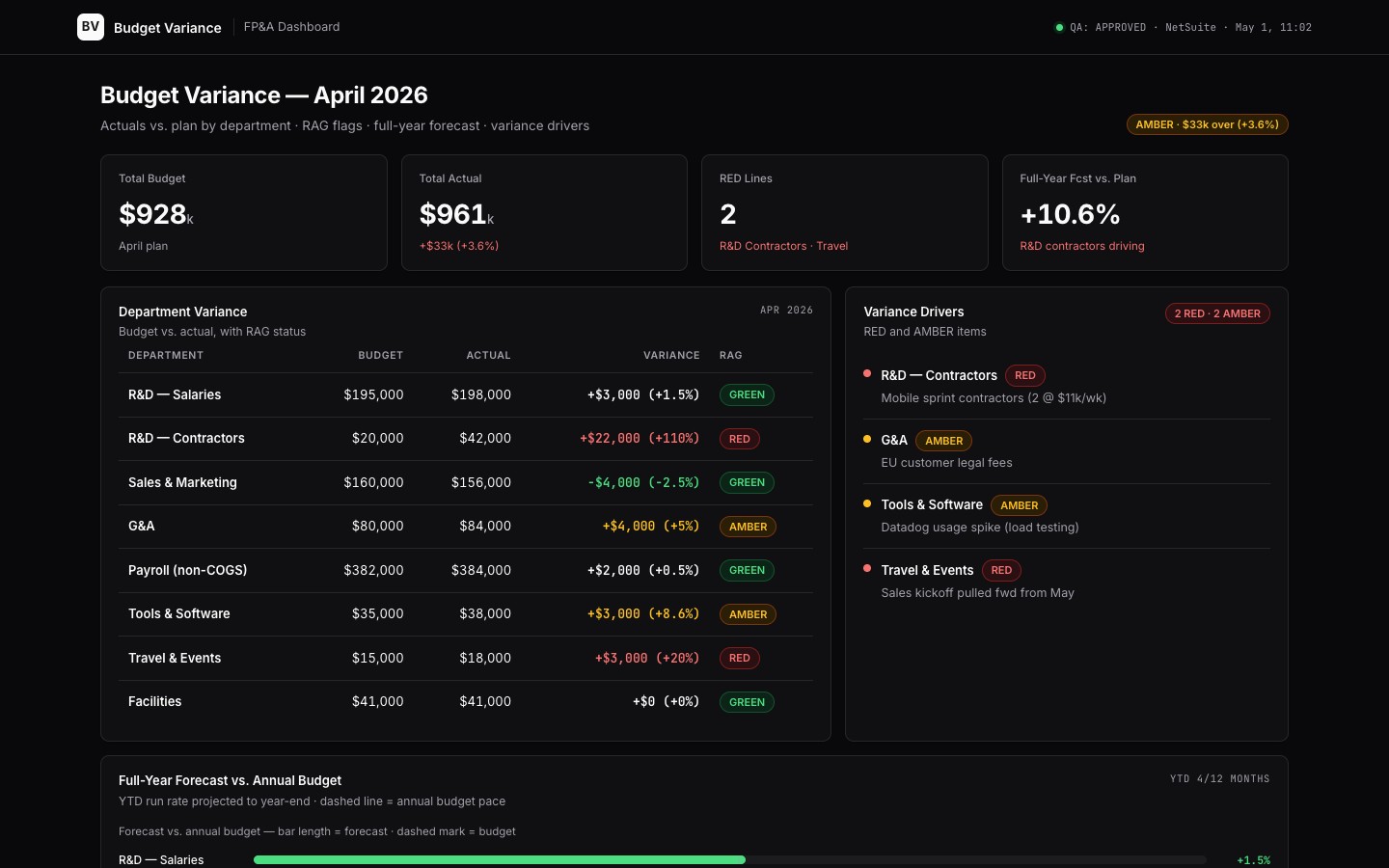
- Open [[dashboard]] — variance by department: budget vs. actual, variance %, RAG flag, key drivers, and full-year forecast table.
- Browse
data/variance-may-2026.md— the structured data file with per-department actuals, budgets, and variance reasons. - Check
.cabinet-state/overspend-alert.md— the weekly flag the Analyst drops when any department exceeds 110% of its weekly budget pace.
Connectors
Required: ERP (NetSuite/QuickBooks/Xero — GL actuals and budget lines), payroll system (headcount actuals). Recommended: BI tool (Looker/Metabase for actuals pull), department tracking sheets (Google Sheets / Notion), Slack (overspend alert delivery).
$ git clone --filter=blob:none --sparse https://github.com/hilash/cabinets.git && cd cabinets && git sparse-checkout set budget-variance