
IT Request Cabinet
v0.1.0Structured IT request intake and routing for modern teams. One routing agent triages every incoming request — hardware, software, access, or support — routes it to the right owner, tracks SLA compliance, and deflects common questions with a living FAQ. Keep ServiceNow and your ticketing system; replace the Slack noise, the Google Form black holes, and the missed SLA fire drills around them.
IT Request Cabinet
agents
IT Router
.agents/it-router/
Daily Request Triage
0 9 * * 1-5
IT Workflow Agent
.agents/it-workflow/
Weekly SLA Report
0 8 * * 1
2
Agents
2
Jobs
1
Depts
2
Pages
Triages every incoming IT request, assigns priority and category, routes to the right owner, and monitors SLA compliance across the full queue.
Executes IT operational steps — ticket status updates, triage notes, SLA escalations, FAQ maintenance, and the weekly SLA compliance report.
IT Request Cabinet
Every IT request — hardware, software, access, VPN, printer, "my laptop won't boot" — lands in one structured queue, gets triaged by priority and category, routed to the right owner, and tracked against its SLA. Common questions are deflected before they become tickets. Every artifact is a file: the queue state, the triage log, the SLA report.
Keep ServiceNow and Jira Service Management. Replace the Slack #it-help black hole, the Google Form nobody checks, and the "did anyone pick this up?" follow-up threads.
The team
- [[.agents/it-router]] — IT Router (lead). Triages every incoming request, assigns priority, routes to the right owner, and monitors SLA compliance across the queue.
- [[.agents/it-workflow]] — IT Workflow Agent. Executes the operational steps: updating ticket status, writing triage notes, escalating breached SLAs, and maintaining the deflection FAQ.
Recurring rhythm
| Cadence | Job | Owner | Output |
|---|---|---|---|
| Daily (Mon–Fri 09:00) | [[.jobs/daily-request-triage]] | IT Router | Triage log, routed tickets, SLA flag list |
| Weekly (Mon 08:00) | [[.jobs/weekly-sla-report]] | IT Workflow | SLA compliance report in /reports/ |
How to run the demo
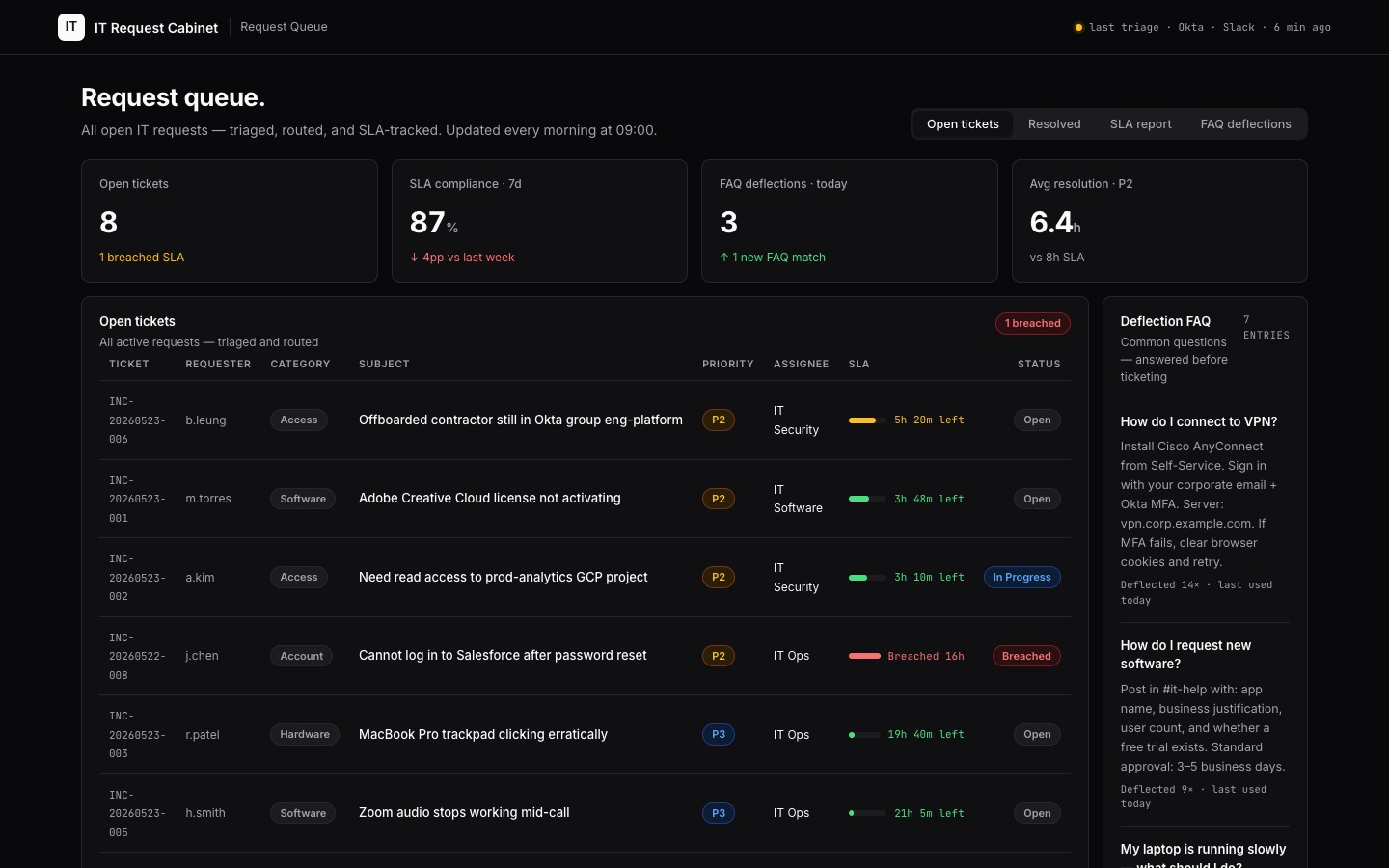
- Open the [[queue]] — the live IT request queue: every ticket with requester, type, priority, assignee, SLA timer, and status. Includes a deflection FAQ panel for common questions.
- Browse
/requests/— the individual request files the agents write for each ticket. - Open
/reports/sla-report.md— the weekly SLA compliance summary.
Connectors
Required: Slack (intake channel #it-help), Okta (identity + access context), Google Workspace or Microsoft 365 (account actions).
Recommended: ServiceNow (ticket sync), Jira Service Management (ticket sync), Jamf or Kandji (device context for hardware tickets).
Keep your ticketing system. This cabinet replaces the intake and routing chaos — the missed Slack messages, the Google Forms that go to a shared inbox, the SLA tracking in a spreadsheet — not the ITSM platform your team already knows.
$ git clone --filter=blob:none --sparse https://github.com/hilash/cabinets.git && cd cabinets && git sparse-checkout set it-request