
Spend Policy Cabinet
v0.1.0Answers "can I expense this?" instantly, flags anomalous transactions before month-end, and keeps department spend summaries current — so Finance spends less time on policy Slack questions and more time on analysis.
Spend Policy Cabinet
agents
Policy QA Agent
.agents/qa/
Weekly Policy Q&A Digest
0 8 * * 1
Policy Research Agent
.agents/research/
Weekly Spend Anomaly Flag
0 8 * * 1
2
Agents
2
Jobs
1
Depts
2
Pages
Keeps data/policy.md accurate when Finance updates limits or categories, reviews the Research agent's escalated flags for policy accuracy, and publishes a weekly Q&A digest for the team.
Answers employee spend questions by reasoning over the live policy doc, flags anomalous transactions from the weekly card export, and summarizes department spend by category.
Spend Policy Cabinet
A Research agent answers "can I expense this?" questions instantly by reasoning over the live policy doc, flags unusual spend each week, and summarizes department expenses. A QA agent keeps the policy cards accurate and catches edge-case answers before they go out. Fewer Slack questions. Faster reimbursements. No surprises at month-end.
Keep Ramp, Brex, or Expensify as your card platform. Replace the policy PDF nobody reads, the Slack thread with six different answers, and the manual anomaly hunt at close.
The team
- [[.agents/research]] — Policy Research Agent. Answers employee spend questions by reasoning over
data/policy.md; flags anomalous transactions from the weekly card export; summarizes department spend by category. The employee-facing member of this cabinet. - [[.agents/qa]] — Policy QA Agent. Reviews the Research agent's answers for accuracy, checks flagged transactions against policy thresholds, and keeps
data/policy.mdcurrent when Finance updates limits or categories.
Recurring rhythm
| Cadence | Job | Owner | Output |
|---|---|---|---|
| Weekly (Mon 08:00) | [[.jobs/weekly-anomaly-flag]] | Research Agent | Anomaly flag in .cabinet-state/ |
| Weekly (Mon 08:00) | [[.jobs/weekly-policy-qa-digest]] | QA Agent | Q&A digest in .cabinet-state/ |
How to run the demo
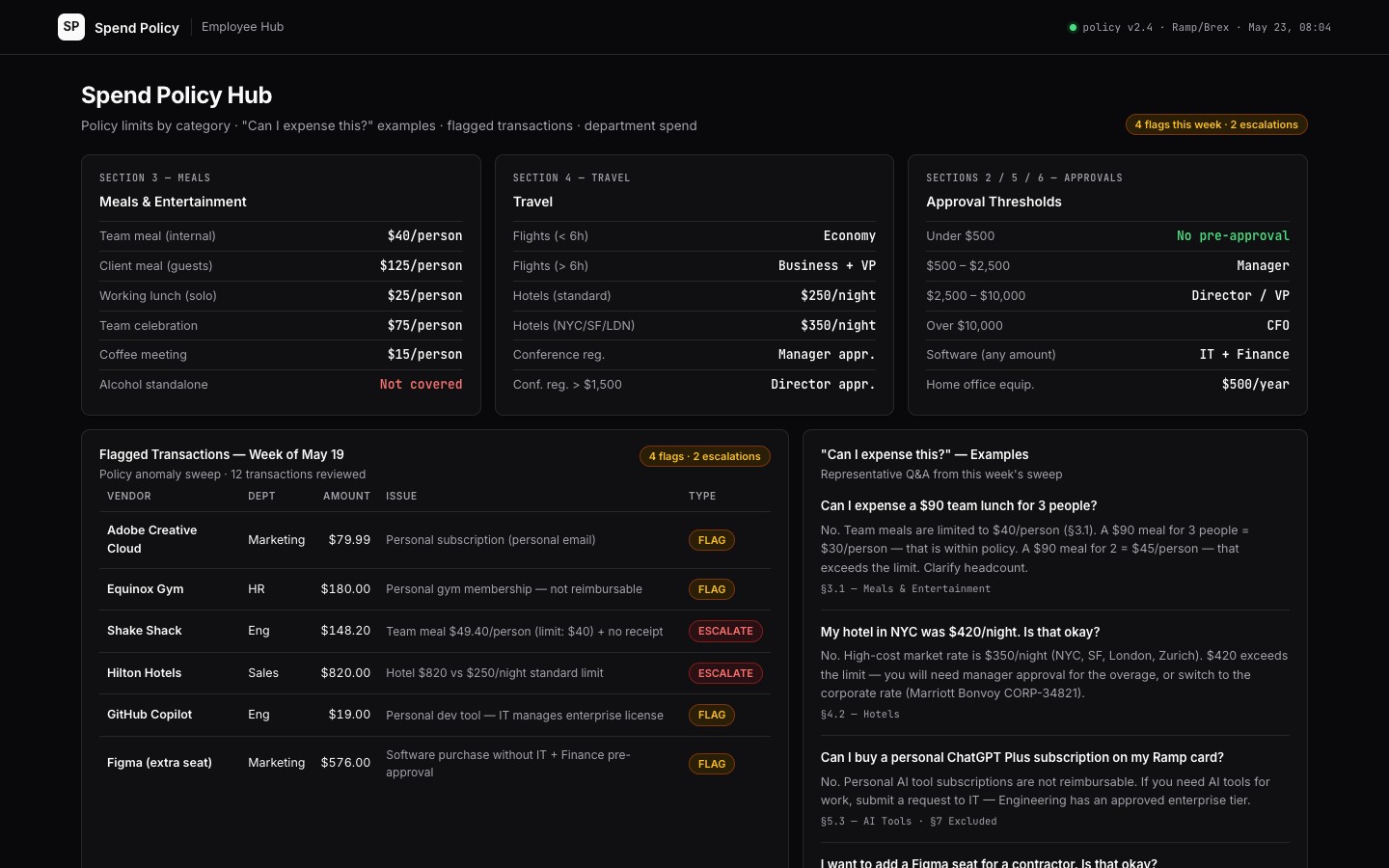
- Open [[hub]] — the spend policy hub: policy cards by category with limits, example Q&A pairs, flagged transactions from the last sweep, and department spend summary.
- Browse
data/policy.md— the structured spend policy the Research agent reasons over. - Check
.cabinet-state/anomaly-flag.md— this week's flagged transactions with policy section reference and recommended action.
Connectors
Required: Ramp, Brex, or Expensify (card transaction export), expense policy doc (current version in Drive or Notion). Recommended: Slack (policy Q&A delivery, anomaly alerts), Google Sheets (department manager spend summaries), HR system (employee cost-center mapping).
$ git clone --filter=blob:none --sparse https://github.com/hilash/cabinets.git && cd cabinets && git sparse-checkout set spend-policy