
Support Intelligence Cabinet
v0.1.0Clusters support tickets by theme, surfaces recurring pain patterns, and ships a weekly insights report — so your support team stops firefighting noise and starts fixing root causes. Keep Zendesk or Intercom. Replace the manual tagging, the ad-hoc reports, and the "why do customers keep asking about X?" Slack thread.
Support Intelligence Cabinet
agents
Insights Synthesizer
.agents/insights-synthesizer/
Weekly Support Insights Report
0 8 * * 1
Ticket Cluster Analyst
.agents/ticket-cluster-analyst/
Daily Ticket Cluster Scan
0 9 * * 1-5
2
Agents
2
Jobs
1
Depts
3
Pages
Owns the weekly Support Insights Report — pulls cluster data, CSAT, and deflection metrics, identifies product pain patterns, and writes a report leadership and product teams actually read.
Runs the daily ticket clustering pass — groups tickets by theme, measures volume trends, detects sentiment shifts, and flags emerging issues before they overwhelm the queue.
Support Intelligence Cabinet
Two agents scan every inbound ticket, cluster recurring issues by theme, detect emerging problems before they hit the queue at scale, and ship a weekly Support Insights Report with CSAT trends, deflection rates, and concrete recommendations. Every cluster, every tagged ticket, and every report is a file you can open, share, and act on.
Keep Zendesk or Intercom. Replace the manual tagging, the Explore dashboards nobody interprets, and the "why do customers keep asking about X?" Slack thread nobody resolves.
Why this template
Most support teams have ticket volume data but not insight data. They know they're busy; they don't know why. This cabinet makes the ticket analysis a standing operation: clusters are rebuilt daily, trends are surfaced weekly, and the product and engineering teams always have a sourced view of the top pain points — not a survey, a living analysis of real tickets.
The team
- [[.agents/ticket-cluster-analyst]] — Ticket Cluster Analyst. Runs the daily clustering pass, tags tickets by theme, detects volume spikes, and flags emerging issues before they become incidents.
- [[.agents/insights-synthesizer]] — Insights Synthesizer. Owns the weekly Support Insights Report: pulls the week's clusters, CSAT, deflection metrics, and draft product pain recommendations. Orchestrates the final publish.
Recurring rhythm
| Cadence | Job | Owner | Output |
|---|---|---|---|
| Daily (Mon–Fri 09:00) | [[.jobs/daily-ticket-cluster-scan]] | Ticket Cluster Analyst | Updated cluster list in /clusters/, emerging issues flagged |
| Weekly (Mon 08:00) | [[.jobs/weekly-insights-report]] | Insights Synthesizer | Support Insights Report in [[dashboard]] |
How to run the demo
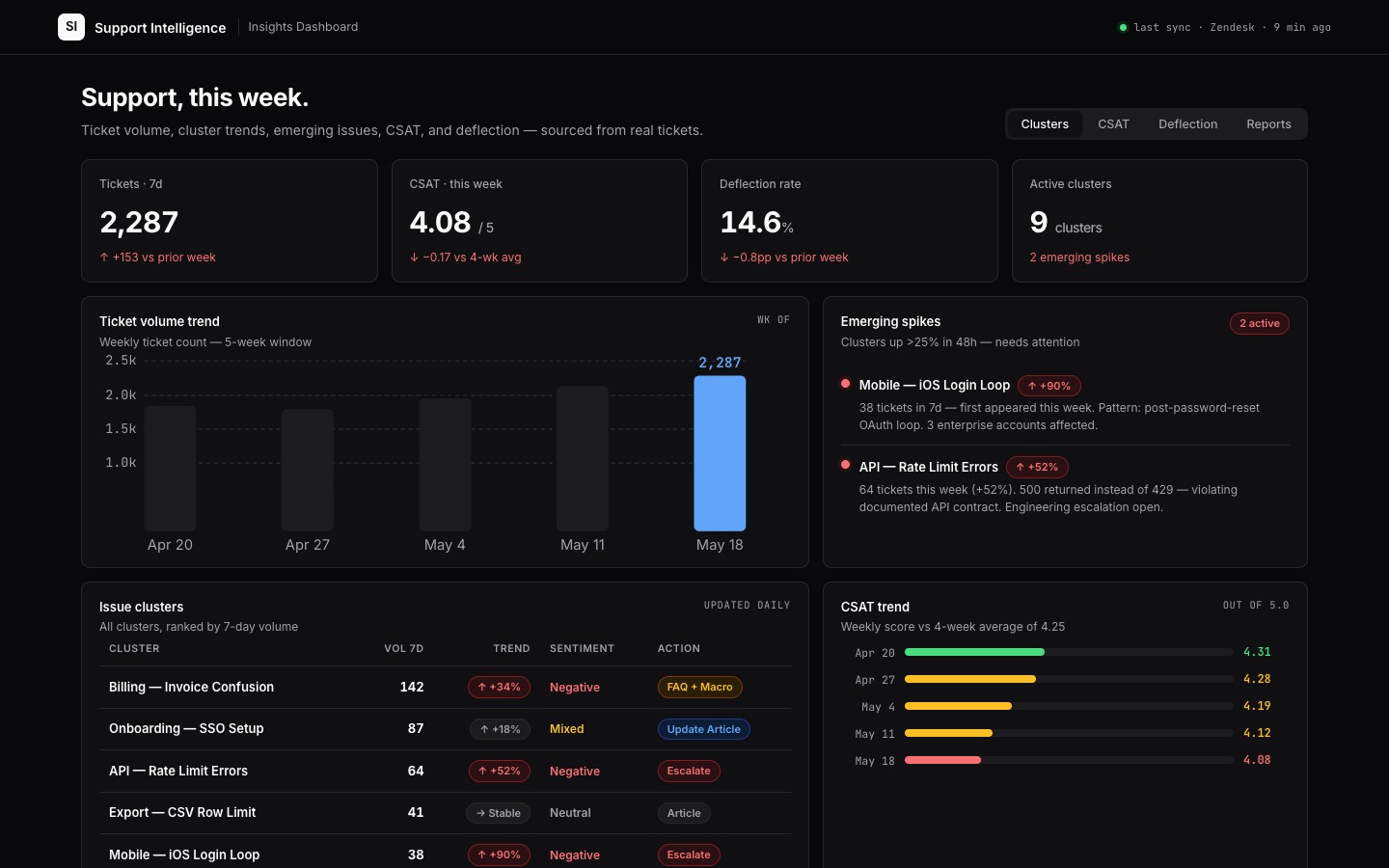
- Open the [[dashboard]] — ticket volume trend, top issue clusters with counts and sentiment, emerging issues, CSAT, and deflection rate at a glance.
- Browse
/clusters/— each file is a labelled ticket cluster with representative tickets, volume, and trend. - Open
/reports/— the weekly insights report the Synthesizer writes each Monday.
Connectors
Required: Zendesk, Intercom, or Freshdesk (ticket export via API).
Recommended: Jira or Linear (link clusters to product backlog), Slack (#support-insights channel), CSAT/NPS survey tool (for satisfaction data overlay).
Demo data
| Cluster | Volume (7d) | Trend | Sentiment |
|---|---|---|---|
| Billing — invoice confusion | 142 | ↑ +34% | Negative |
| Onboarding — SSO setup | 87 | ↑ +18% | Mixed |
| API — rate limit errors | 64 | ↑ +52% | Negative |
| Export — CSV format issues | 41 | → Stable | Neutral |
| Mobile — iOS login loop | 38 | ↑ New | Negative |
Every cluster is a file in /clusters/. Every insight in the dashboard links to its cluster file.
$ git clone --filter=blob:none --sparse https://github.com/hilash/cabinets.git && cd cabinets && git sparse-checkout set support-intelligence